Tuesday, October 23, 2012

Top 10 Websites For Hackers

Hi,
As i said i am back with more stuff for you guys,
Hope you all enjoy them,
So i am here to tell you guys world top 10 websites for hackers,
Which every hacker should know about,
So lets start,


1. Milw0rm

i have given this website the first rank because it is the major place for all milw0rm-wi
security guys,and penetration testers and the major of us hackers..


2. Hack a day
Second comes this, 
its great for hackers to have a community like this,hackaday-logo
with compitions,and stuff

3. Security Focus
These guys are great in terms of security testing,

4.ASTALAVISTA - secuirt y & hacking community
Another great place like Top milw0rm…

5.PacketStorm Security
Name tells it all :)

6.Black Hat

7.Metasploit Project

8.Insecure.org: Top 75 Security tools

9.2600 Store

The Birth Of hacking Is here …..

10.Rootkit

Hope you get that,
These where the place you must visit,

How To Run Mac On Your PC!

Hey,

There is a huge debate on Windows Vs Mac

huge upside for mac is that you can run windows through boot camp on there system.
But how is this better then a Windows PC when you could install mac on it as a secondOS.

 Follow the steps :- 

1. Go to Google and search for Kalyway download.

2. Once you have found a Kalyway download.
Download the ISO file and burn it to a blank DVD.


3. Restart your PC and at the bios select Boot from Cd

4. Follow the on screen instructions to install mac to your PC.


Make sure you create a second partition for the mac installation. Unless you couldoverwrite your whole windows installation.
When the installation has been finished reboot your computer. The Darwin boot loadershould come up asking you if you would like to boot into windows or mac.

 Screen shots 


For those who cant find on google,
Here is the link,


How To Create A Invisible Account In Windows XP


Ok, A really Quick tutorial on for windows XP on How To Create A Invisible Account In Windows Xp. What we have do in this hack is really simple just create a DWORD valuein the windows registry and hack the windows user accounts .


Ok so are you sure you want to learn this hack then read ahead,

Steps :-


1. Open Start menu then click on RUN.
2. Type in the Run Window Regedit 
3. Windows Registry editor will open then navigate from the left panel :

HKLM\Software\Microsoft\WindowsNT\CurrentVersion\Winlogon\SpecialAccounts\UserList
4. Create a new DWORD, setting its name to the name of the account you wish to hide.
5. Then set its value to to hide it.
6. Enjoy its Hidden !!

NOTE : This account isn't completely hidden because it is visible to administrators inLocal User and Groups and also the profile is visible in the Documents and Settings.
 
Now How To Login In it after you have hidden the account :

1. At Welcome screen, and you want to login to this account.
2. Press Ctrl+Alt+Delete twice and it will display the log-on promt.
3. Type the username, and the password and hit enter.

Team Viewer 5 Beta Released


The new version of Team Viewer is going to released soon, as its BETA version is out.en_widgets_video_audio
Company says it have some new features in which includes VoIP, webcam and application selection will give you an even better, easier and faster desktop sharing experience.

The new version of Team Viewer is being out after a long interval as it was also due to release of the Microsoft's major release of their nextOS Windows 7.

But Officials are saying the new version is fully compatible with Windows 7 and can perform many tasks with Windows 7 as with other versions on Windows.
Some New Features Are :-windows7_s

1. Audio (VoIP) / Video.
2. Enhanced and Flexible Session Control.
3. Team Viewer Manager 5.
4. Additional New and Improved Functionalities.
5. Licenses, Updates and Downward Compatibility.

btn_downv53_new

VMWare Fusion 3.1 Beta On Grounds


Check out the VMWare Fusion 3.1 Beta which have been out just now. Its includes some of the significant features which many of the users have been waiting for. Some of them are really good which mostly includes graphic issues.

VMWare have been the major choice for the users to run Windows on Mac and pentesting for most of us on windows. The Beat 3.1 is out which have some major improvements in 3D application like games and windows Aero stuff…

OpenGL 2.1 is now also supported in this version for Windows 7 and Windows Vista. They claim better DirectX 9.0 SM3 performance as well (and hopefully that means more DirectX 9.0C app compatibility).

You can configure larger virtual machines as well, with the maximum virtual disk expanded from 950 GB to 2 TB. They now support up to 8-way symmetric multiprocessing as well. These are some of the features you will see in this Beat version.

VMware_fusion_windows_7_aero
You can download the beta here, test it, and have some of the nice features early for your use. If you want you can also give some tips to them and help them get doing the thing done fast for the final version.

So there you go - Download

35+ Nokia Cheat Codes


Nokia is a cell phone marketing company which is currently comes in world top rates mobile phones.
Now its obvious that a company like Nokia would use some secret codes for programmers to handle the cell phones in quick usage this post mainly focuses on the secret codes given by the company and how can we make most out of it.

Note this post refers to the cell phone hacking which is also know by its code name i.e.PHREKING
Ok So lets us suppose you have a new * Nokia E6.
and you cant make anything out of it then these codes are just for you.

I have written this short list of 35 + Nokia mobile secret code.

Lets start :-

*3370# Activate Enhanced Full Rate Codec (EFR) - Your phone uses the best sound quality but talk time is reduced my approx. 5%

#3370# Deactivate Enhanced Full Rate Codec (EFR)

*#4720# Activate Half Rate Codec - Your phone uses a lower quality sound but you should gain approx 30% more Talk Time

*#4720# Deactivate Half Rate Codec

*#0000# Displays your phones software version, 1st Line : Software Version, 2nd Line : Software Release Date, 3rd Line : Compression Type

*#9999# Phones software version if *#0000# does not work

*#06# For checking the International Mobile Equipment Identity (IMEI Number)

#pw+1234567890+1# Provider Lock Status. (use the \"*\" button to obtain the \"p,w\" and \"+\" symbols)

#pw+1234567890+2# Network Lock Status. (use the \"*\" button to obtain the \"p,w\" and \"+\" symbols)

#pw+1234567890+3# Country Lock Status. (use the \"*\" button to obtain the \"p,w\" and \"+\" symbols)

#pw+1234567890+4# SIM Card Lock Status. (use the \"*\" button to obtain the \"p,w\" and \"+\" symbols)

*#147# (vodafone) this lets you know who called you last

*#1471# Last call (Only vodofone)

*#21# Allows you to check the number that \"All Calls\" are diverted to

*#2640# Displays security code in use

*#30# Lets you see the private number

*#43# Allows you to check the \"Call Waiting\" status of your phone.

*#61# Allows you to check the number that \"On No Reply\" calls are diverted to

*#62# Allows you to check the number that \"Divert If Unreachable (no service)\" calls are diverted to

*#67# Allows you to check the number that \"On Busy Calls\" are diverted to

*#67705646# Removes operator logo on 3310 & 3330

*#73# Reset phone timers and game scores

*#746025625# Displays the SIM Clock status, if your phone supports this power saving feature \"SIM Clock Stop Allowed\", it means you will get the best standby time possible

*#7760# Manufactures code

*#7780# Restore factory settings

*#8110# Software version for the nokia 8110

*#92702689# Displays -
1.Serial Number, 2.Date Made, 3.Purchase Date, 4.Date of last repair (0000 for no repairs), 5.Transfer User Data. To exit this mode you need to switch your phone off then on again

*#94870345123456789# Deactivate the PWM-Mem

**21*number# Turn on \"All Calls\" diverting to the phone number entered

**61*number# Turn on \"No Reply\" diverting to the phone number entered

**67*number# Turn on \"On Busy\" diverting to the phone number entered

12345 This is the default security code

press and hold # Lets you switch between lines

*#3283# or *#DATE# Date of Manufacture

*#682371158412125# Software Version

*#92702689# - Enter the service menu

*#7370925538# - Delete all the content of the wallet and the wallet code
*NOTE: Some codes depends on the Mobile you are Using.


Hope you all used them well,
well if you like this post then please Subscribe to our Blog posts.
to get these hacks straight into your Inbox
Till Then this is me HTD signing OFF.

Make Your Computer Talk !

Yeah its a really big story behind this hack,
I was just wandering here and there on the net,
and then something tickled in my head that, How cool it would it would be
if i have my box talking and telling me stats of the computer just for fun
It would also produce that hacker felling in to and would be so cool to Show OFF !!

After few rounds of Mine on internet on searching on Google i couldn't
Find on it but then i thought to code it because there was no choice left for me 
So i just picked my laptop and got with VBS.
Its really cool to code on vbs because its really simple and easy,
So i just went on with it
and produces this little hope you all like its :)

Just Follow these Simple Steps :-

1. Open Notepad.
2. Copy the following code and paste in the notepad.


Do
Dim msg, sapi
msg="8ahiaushdiuhasd7w2uh7kahsudha Is the Code For you Hacker next is 7aygsdyagd7aw7dgiauw6twr2jsddd There is good code Hacker e812ge8"
Set sapi=CreateObject("sapi.spvoice")
sapi.Speak msg
loop
 talk
3. Save it as Talker.vbs. 
4. Then RUN it.
5. And WOOOOSH…………!!!!!
6. The Computer starting to talk by it self.
7. You can also edit it if you want to talk anything else ;)
    For that just Edit the content of   msg=" # " In second line of this code.
8. If you wan to stop it,its really simple just Follow the steps :-
    a. Hit CTRL +  ALT  + DEL  >> that will open the task manager.
    b. Choose Processes TAB   >> to view the running processes.talk
    c. Find wbscript.exe in the list,Select it and the Hit End Process Button.
9. And then Enjoy !!

Some think you would like to know to grow your knowledge !!

Speech Application Programming Interface (SAPI) is an audio interface that was developed to use within Windows operating systems, the idea behind SAPI was to make possible the use of speech synthesis and recognition within the function of various Windows applications

Its really cool to SHOW OFF in front of others,
as to show them that you are a great hacker
a screen saver of matrix would be like a desert on it !!!
Download
Its really a small hack i use to in my free time.
Just wanted to share with you Guys !!

Spam your friend !!


This is not a new technique, it is also called E-Mail Bombing,zx9s06-w200-h200
Well its pretty awesome if you like it,

Its task is to bomb an E-mail ID or any other means of communication. but you can view its usage in many areas its really cool to hack your friends in minute just for fun.
well this works in major cases but in this posts i am gota be showing you a E-mail bombing software.

Just follow the follow these really simple steps :-
1. Download this E-mail bomber.
Download
2. After downloading Run it.
3. Enter the victims Email address or if you want to hack your friend then enter his email address.
4. The Enter the Subject of the Bombing.
5. Then enter your email address  (only Gmail supported).  [ NOTE : Enter with suffix@gmail.com or it wont work. ]

6. Then enter your email password.
7. Enter the message you want to send to him.
8. Enter the number of messages you want to send to him.
9. Then hit Send.
10. You have successfully bombed your friend. ;)
zx9s06
That was easy.

This is one of a kind of email bomber you saw.bomb-w200-h200
there are many of these hack tools i gotta be discussing later.
if you want to wait you can wait.

But you can also SUBSCRIBE to the the blog posts.
And get through the easy way , that's what hacking is all about.

Google Password Decryptor – Hack Anyone's Google Passwords


Google Password Decryptor is a Password Recovery Tool which can be used to recover your lost Google account passwords using the Google software's installed in your computer. But it can used as a hacking tool as i say.
 Google Account hacking
This software's works on the simpleGoogle accounts vulnerability that all the Google web products such as Gmail, blogger, Google docs etc uses the same username and passwords and hence when you get the username and password of one Google web product such as of let us take here Gmail then you can use all the other Google products such as Ad words, Ad sense etc and hence Hacking the victim.

Google Password Decryptor is a software's which decrypt in seconds all the usernames and passwords stored in the victims computer like if he uses Gtalk it will decode the password stored in the victims computer to reveal the username and passwords…
It Supports many Google software's such as -

Google Talk 
Google Picassa 
Google Desktop Seach 
Gmail Notifier 
Google Chrome

Steps To Use Google Password Decryptor -


1. After Downloading Extract the software in a folder.
2. Then Run “GooglePasswordDecryptor.exe” in the extracted folder.
3. When the software Loads click on “Start Recovery” Button.
4. Done !!

Note : You Can save this list to HTML format or TEXT format by clicking on ‘Export to HTML’ or ‘Export to TEXT’ button.

Screen Shots :-


google hack

google hacked

Download


*via Easy-Share

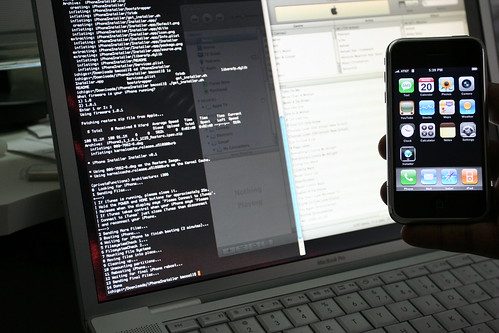
Hacking iPhone


Hey, there i have been working around for you guys so hard and you are,i8
Not even subscribing to my posts.
It hurts direct in my heart.

So,Lets start with some basics do you can understand the way i do.

Basics

As with most handheld devices,

The iPhone has a locking mechanism to protect the device’s data.
This locking mechanism can be manually invoked, but is more frequently invoked by an “Auto-Lock” feature. The “Auto-Lock” feature will wait for the phone to be idle for a user defined number of minutes before automatically invoking the locking mechanism.

When the device is in the locked and powered on state, the data on it cannot be accessed via iTunes or any other means.
Once the iPhone is in a locked state, the user must enter a pass code to access the device. This prevents against data theft in a scenario where the device is lost or stolen. The pass code is normally 4 digits long, which may be susceptible to brute force attacks given enough time and patience. There is also a delay after a certain number of incorrect attempts.


Finally, the device can wipe its memory if the lockout threshold is reached which would probably end up deterring most attackers. The locking mechanism can also be set to use a more complex password containing any combination of letters, numbers or symbols. This can be done using the iPhone Configuration Utility freely available from Apple (http://www.apple.com/support/iphone/enterprise/).


Keychain


The Keychain The keychain is a SQLite database stored in the/private/var/Keychains/keychain-2.db file on the iPhone. It stores the passwords used on the device, including any passwords used for email accounts. As of firmware version 2.2(?), the device pass code is also stored within this keychain file.

Our Hacking Tool

QuickPwn QuickPwn (http://www.quickpwn.com/

is a closed-source, Windows-based tool for jail breaking the iPhone released by the iPhone Development team and poorlad.

What makes QuickPwn unique is the method it uses to write data to the iPhone. Normally, when an iPhone is reflashed using iTunes, all data on the device is lost.

QuickPwn uses a different method which preserves all data except the data it is explicitly told to overwrite. QuickPwn was written so iPhone owners can easily jail break their iPhone with limited technical savvy.

Bypassing the Pass code


Let’s start to put all of this information together. We know that the pass code is stored within the keychain.
If we can overwrite the keychain with one that doesn’t contain a pass code, we may be allowed to bypass the pass code protecting the device (because it doesn’t exist after we overwrite it!).

We also know that if we put the phone in DFU mode, we can overwrite data on the phone, and if we use QuickPwn, we can selectively overwrite only particular data. So, using a customized QuickPwn package, we can overwrite the keychain and effectively bypass the pass code.
Result Once we bypass the pass code, all locally stored data (photos, emails, contacts, notes, etc...) is accessible.

Remember, the keychain also stores the passwords for other applications.

This means that if we overwrite the keychain file, we will have to re-input all passwords for applications which use the keychain. During testing, I was able to access all locally stored emails (including exchange accounts, etc...),
but could not send or receive any new emails because I did not have the password stored in my keychain. As I discovered later on, it is possible to simply move the keychain then access it at a later date.
his process was detailed on http://www.zdziarski.com/ To bypass the pass code in v2.2, all one needs to do is move the keychain out of the way, then reboot.
mv /private/var/Keychains/keychain-2.db / This preserves the suspect's keychain, resets the pass code, and also temporarily disables any account passwords from the device so that the suspect's accounts won't be accessed by the iPhone, further preserving the file system.

To restore all accounts, move the old keychain file back and reboot. You can manually remove the pass code lock from the keychain by deleting its record with sqlite3: delete from genp where acct = "DeviceLockPassword"; The process described below will only work on iPhone 3G devices. However, the process can be modified to work with other models.
NOTE : No testing was performed on firmware versions besides 2.2.1. Since firmware 2.2 was first to store the pass code in the keychain, this exact sequence will not work on previous versions. However, the previous versions can be easily changed by modifying the settings file which enables the lock functionality as described in Jonathan Zdziarski’s webinar.

Procedure


Test Environment Testing was performed using a jail broken iPhone 3G 8GB (Phone A - which is used as our testing phone) and a stock, non-jail broken iPhone 3G 16GB (Phone B - which is our target phone). Phone B was set up with an Exchange email account, and various personal data (notes, pictures, etc.).

Additionally, Phone B was configured with a pass code. The goal of the testing was to retrieve all of this data from Phone B without knowledge of the pass code. The other hardware used was a laptop running Windows XP with iTunes 8, and an Ubuntu Linux VM.

Copying the Keychain Phone A (test phone, previously jail broken using QuickPwn) was configured with a pass code then accessed remotely via SSH. The keychain was compressed with permissions intact:

iphoneA # tar –pcvf Keychain.tar /private/var/Keychain/keychain-2.db \ /private/var/Keychain/TrustStore.sqlite3

It was then copied off of the device using WinSCP

QuickPwn version 2.2.5-2
DownloadTo access the actually QuickPwn executable and data follow these steps:

1. Double click QuickPwn.exe
2. While QuickPwn.exe is running, go to Start -> Run and type %TEMP%
3. Look for the RarSFXN (where N is a number, this value changes per computer) directory or the last directory created . A look into this directory should reveal that it contains QuickPwn.exe and a number of additional files and directories. This is the QucikPwn application.
4. Copy this entire directory to a new location. In the example below, I have copied the directory to C:\RarSFX1.
5. Close the QuickPwn application.
Your directory should look similar to the screenshot below:

i

Modifying Cydia, Cydia is a package manager for applications written to run on jail broken iPhones.

It’s normally installed when you use QuickPwn to jail break a phone.
In order to bypass the pass code on Phone B, we’ll add the Keychain copied from Phone A and integrate it into the Cydia package.

This ensures the Keychain is installed on Phone B during the jail break process with QuickPwn.

Using our example, copy C:\RarSFX1\Data\Cydia.tar.gz  and our Keychain.tar to the Ubuntu Linux VM via SCP. Decompress Cydia.tar.gz then Keychain.tar.

Then recompress the Cydia and the Keychain directory structures together into a single zipped tarball named Cydia.tar.gz. Ensure you preserve all permissions and run all commands as root.

LinuxBoxen # tar –pxvf Cydia.tar.gz LinuxBoxen # tar –pvf Keychain.tar LinuxBoxen # rm Cydia.tar.gz Keychain.tar LinuxBoxen # ls –tla private/var/Keychain/keychain-2.db -rw------- 1 64 root 28672 2009-02-04 12:51 private/var/Keychains/keychain-2.db LinuxBoxen # tar –pcvf Cydia.tar . LinuxBoxen # gzip Cyida.tar
The command on line 4 is to verify that Keychain.tar decompressed properly and the keychain-2.db file exists with proper permissions. Now use WinSCP to copy your newly created Cydia.tar.gz from the Linux VM to the Windows system and replace the

C:\RarSFX1\Data\Cydia.tar.gz
file with it.


Modifying QuickPwn Next, QuickPwn must be modified so it won’t run its checks to ensure the device is connected properly when it first launches. We do this because Phone B is locked so it will not register properly with QuickPwn.

First, download .NET Reflector from http://www.red-gate.com/products/reflector/ and Reflexil from http://sebastien.lebreton.free.fr/reflexil/.

Decompress them both, then load reflector and the Reflexil Add-On:

1. Launch Reflector, select C# from the drop down menu in the middle, then go to View -> Add-Ins

2. Click Add and select Reflexil.dll from the folder where you placed the decompressedReflexil zip.

i2
3. Select Open then close the Add-In window

4. Next, go to File -> Open and select c:\RarSFX1\QuickPwn.exe.
5. To remove the Splash Screen: expand QuickPwn -> QuickPwn.exe -> { } QuickPwn -> frmStartup and double click "LaunchSplash(): Void".

6. Go to Tools -> Reflexil v0.9 to load the Add-In. You should see the Reflexil pane open in the right of the Reflector window

7. In the Reflexil pane on the bottom right, highlight all instructions except the last(opcode: ret). Right click and delete all the lines thus removing the splash screen display code.

i3

8.  Now for the good stuff! In the left hand pane of .Net Reflector expand QuickPwn -> QuickPwn.exe -> { } QuickPwn -> frmStartup and double click "picNext_Click(Object, EventArgs): Void". This is the function for the startup form which activated the Next button.

9. In the Reflexil pane on the bottom right, go down to instruction 09, right click -> edit and change the opcode from "brfalse.s" to "brtrue.s"
i4


10. Finally, expand QuickPwn -> QuickPwn.exe -> { } QuickPwn -> frmFirmware and double click double click ".ctor()"

11. In the Reflexil pane on the bottom right go down to instruction 28 and change the opcode from "brfalse" to "brtrue"

12. Then, in the Reflexil pane on the bottom right go down to instruction 32 and change the opcode from "brture.s" to "brfalse.s"

13. Finally, click QuickPwn.exe from the left pane tree, and click “Save As” from the Reflexil pane on the bottom right. Save it as C:\RarSFX1\QuickPwn.Patched.exe
so, you can really make it saved.
i5

Finishing up the Process

The last step is to jail break Phone B and overwrite its Keychain with the Keychain from Phone A.

Launch the patched QuickPwn executable (QuickPwn.Patched.exe) while ensuring no phones are connected to the Windows computer.

You’ll notice that the splash screen doesn’t start up, and the blue “Next” arrow is grayed out. Even though its grayed and looks disabled, just click on it to continue.

i6


Follow the instructions by providing it the 2.2.1 firmware IPSW and once you get to the “Preparing to Pwn” screen (shown below) connect your passcode protected device.

Again, the Next button may not turn blue, but you should be able to click it anyway. Now follow the on-screen directions to put your phone into DFU mode.

i7


Once the process completes and you see the Apple logo on the screen of the iPhone, disconnect the USB cable and your device should be no longer passcode protected.

I’m sure if you decided to write your own application specifically for this process you’d be able to do this a little more efficiently.