Wednesday, July 30, 2014

How to add unread mails to favorite folder in Outlook?

The following guidance will help you collect all unread email messages into an Unread Mail folder, and show the folder in your favorites.
Step 1: Shift to the Mail view by clicking the Mail in the Navigation Pane.
Step 2: Create a new search folder:
  1. In Outlook 2010 / 2013, click the New Search Folder button in the New group on the Folder tab.
  2. In Outlook 2007, click the File > New > Search Folder.

Actually there is an alternative method to create a new search folder: right click the Search Folder in Navigation Pane, and click the New Search Folder in the right-click menu.

And this method is available in all of Microsoft Outlook 2007, 2010, and 2013.
Step 2: In the New Search Folder dialog box, select and highlight the Unread mail item, and click OK.

Now an Unread Mail folder is created and shows in the navigation pane. And all unread email messages are collected into this folder automatically. Once an unread email message is opened, it will be removed from the Unread Mail folder automatically.
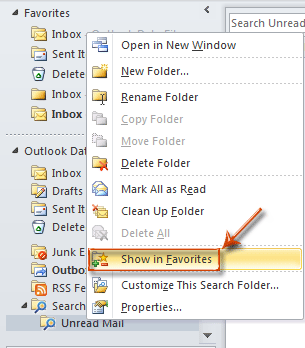
Step 3: Right click the Unread Mail folder, and click the Show in Favorites item in the right-click menu.
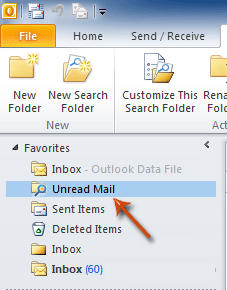
Now the Unread Mail folder is copied and added to your favorites at the top of Navigation Pane.
Thursday, January 16, 2014

How can I remotely shutdown another Windows computer?

Microsoft Windows 2000, XP (XP home users read section below) and later users can remotely shutdown another computer in their network by utilizing the shutdown command. To start the GUI version of this command click Start, Run, and in the Run line type: shutdown -i and press enter. After running this command you should see a dialog window shown in the example below.
Windows Remote Shutdown Dialog window
As can be seen in the example above, you'll have several different options to choose from in the Remote Shutdown Dialog.  First specify the name or IP address of the computer you wish to shutdown by clicking the Add button. Next, select Shutdown and keep the Warn users of the action checked if you wish to warn the user of the shutdown before it occurs. Next, in the Shutdown Event Tracker, choose the Option you wish the Event Log to show and enter a comment.

For Windows Home computers

If the remote computer you're attempting to shutdown is running Microsoft Windows Home. You'll need to enable guest remote shutdown privileges before following the above steps will work. To do this follow the below steps.
  1. Download the Windows Resource Kit to the computer you're wanting to remotely shutdown.
  2. Once downloaded and installed, copy the NtRights.exe file from the "Program Files\Windows Resource Kits\Tools" directory into the "Windows\System32" directory.
  3. After the file has been copied open a command prompt window by clicking Start, Run, and typing cmd and pressing enter. At the prompt type the below commands exactly as you see them here (unless your Windows directory is in a different path).

    cd\windows\system32
    NtRights –u Guest +r SeRemoteShutdownPrivilege
    NtRights –u Guest +r SeShutdownPrivilege
  4. If successful after typing each of the above two NtRights commands you should get a success message. Once this has been completed, exit the command prompt window and restart your computer.
Once the above steps have been completed, you should be able to remotely shutdown that computer from another Windows computer.

Unable to get remote shutdown to work

This could be caused by any of the below possibilities.
  1. The domain administrator has group policies in place to prevent remote shutdown.
  2. Remote administration or the $ADMIN share is disabled.
  3. You're logged into an account that does not have administrative privileges.

Alternative solutions

If you're still unable to get the shutdown to work properly, or wish to remotely shutdown earlier versions of Windows such as Windows 98, there are dozens of other utilities that can be installed to allow you to do this. Our alternative recommend solutions are PowerOff and PsShutdown.exe, which is part of the free PsTools suite.

Sunday, April 21, 2013

How to find the Lap if stolen


Personal Laptop carries important data all the time such as, audio, video, app or software collection or may be you personal bank details or business information. If this gets stolen, I know we get pissed off and will be helpless tracking it. I have been questioned by my fellow colleagues and friends if they can track stolen laptop or if they can take some precaution which can help in tracking stolen laptop.
I have got some free programs that will enable you to identify the thief and get stolen laptop back home. This program will also help you identify the thief.
Prey Project

The program is by far No. 1 As for the method of use of the program are very simple; Firstly you’ll need create an account on the prey project website After That Download the program and install it on the computer where the applet will work in subtle and will not Show To The thief, then in the case of stealing the computer you can go to your account at pry which you’ll need to press on the button “computer stolen” which will send a warning for the program through the Internet which will show A picture of the robber through the camera of the computer, as well as the possibility of locating him through IP and use Geo ip to give name of the place which is probably the thief will be in by addition of having a chance to see What the thief is doing in your computer.

LockItTight

This Is similar to the work program preyproject except it does not contact you with the captured images from the thief’s computer to e-mail but it does save them in the company’s server, as the program is free and works in the Windows environment, 7 and 8 as well as older versions like Windows XP. You can also protect your mobile phone Android by applying Android LockItTight.
LockItTight you can work the following in case of computer stealing: taking Photos of thief through the activation of the web cam, locate the thief through Google Maps program and it’s nice that the he’s more specific in locations on other programs.
Locate your laptop

The advantage by using the program is from past programs that you can delete the data remotely in case of stolen computer thus ensure that the thief will not intrude on your files even though the this feature doesn’t exist in the free version of the software, but that if your data is very important Some of dollars to take advantage of this feature will not be an obstacle in front of you. Otherwise, the program provides you with the free version all the features present in other programs

Tuesday, October 23, 2012

Top 10 Websites For Hackers

Hi,
As i said i am back with more stuff for you guys,
Hope you all enjoy them,
So i am here to tell you guys world top 10 websites for hackers,
Which every hacker should know about,
So lets start,


1. Milw0rm

i have given this website the first rank because it is the major place for all milw0rm-wi
security guys,and penetration testers and the major of us hackers..


2. Hack a day
Second comes this, 
its great for hackers to have a community like this,hackaday-logo
with compitions,and stuff

3. Security Focus
These guys are great in terms of security testing,

4.ASTALAVISTA - secuirt y & hacking community
Another great place like Top milw0rm…

5.PacketStorm Security
Name tells it all :)

6.Black Hat

7.Metasploit Project

8.Insecure.org: Top 75 Security tools

9.2600 Store

The Birth Of hacking Is here …..

10.Rootkit

Hope you get that,
These where the place you must visit,

How To Run Mac On Your PC!

Hey,

There is a huge debate on Windows Vs Mac

huge upside for mac is that you can run windows through boot camp on there system.
But how is this better then a Windows PC when you could install mac on it as a secondOS.

 Follow the steps :- 

1. Go to Google and search for Kalyway download.

2. Once you have found a Kalyway download.
Download the ISO file and burn it to a blank DVD.


3. Restart your PC and at the bios select Boot from Cd

4. Follow the on screen instructions to install mac to your PC.


Make sure you create a second partition for the mac installation. Unless you couldoverwrite your whole windows installation.
When the installation has been finished reboot your computer. The Darwin boot loadershould come up asking you if you would like to boot into windows or mac.

 Screen shots 


For those who cant find on google,
Here is the link,


How To Create A Invisible Account In Windows XP


Ok, A really Quick tutorial on for windows XP on How To Create A Invisible Account In Windows Xp. What we have do in this hack is really simple just create a DWORD valuein the windows registry and hack the windows user accounts .


Ok so are you sure you want to learn this hack then read ahead,

Steps :-


1. Open Start menu then click on RUN.
2. Type in the Run Window Regedit 
3. Windows Registry editor will open then navigate from the left panel :

HKLM\Software\Microsoft\WindowsNT\CurrentVersion\Winlogon\SpecialAccounts\UserList
4. Create a new DWORD, setting its name to the name of the account you wish to hide.
5. Then set its value to to hide it.
6. Enjoy its Hidden !!

NOTE : This account isn't completely hidden because it is visible to administrators inLocal User and Groups and also the profile is visible in the Documents and Settings.
 
Now How To Login In it after you have hidden the account :

1. At Welcome screen, and you want to login to this account.
2. Press Ctrl+Alt+Delete twice and it will display the log-on promt.
3. Type the username, and the password and hit enter.

Team Viewer 5 Beta Released


The new version of Team Viewer is going to released soon, as its BETA version is out.en_widgets_video_audio
Company says it have some new features in which includes VoIP, webcam and application selection will give you an even better, easier and faster desktop sharing experience.

The new version of Team Viewer is being out after a long interval as it was also due to release of the Microsoft's major release of their nextOS Windows 7.

But Officials are saying the new version is fully compatible with Windows 7 and can perform many tasks with Windows 7 as with other versions on Windows.
Some New Features Are :-windows7_s

1. Audio (VoIP) / Video.
2. Enhanced and Flexible Session Control.
3. Team Viewer Manager 5.
4. Additional New and Improved Functionalities.
5. Licenses, Updates and Downward Compatibility.

btn_downv53_new